
PC Buster Download

The free PC program
that clears out junk
and fixes what's broken

It removes secretly installed adware and piled-up junk, then measures why your internet, printer or Windows Update isn't working and fixes it with one button.

Free download Windows 10 · 11  |  1.9.0  |  0.9 MB installer
Buster the janitor cat vacuuming up PC-junk ghosts

Before you call a repair shop, try this

Most PC problems people pay to have fixed are one setting gone wrong. PC Buster checks in the same order a technician would and tells you, in plain words, where the problem is.

When ad pop-ups keep appearing

It looks through your browser history for pages that were opened by force, matches the fingerprint of those addresses against program settings on your PC, and catches the culprit. It asks before removing anything, backs up settings, and sends files to the Recycle Bin. Ad bookmarks and notification permissions get cleaned up too.
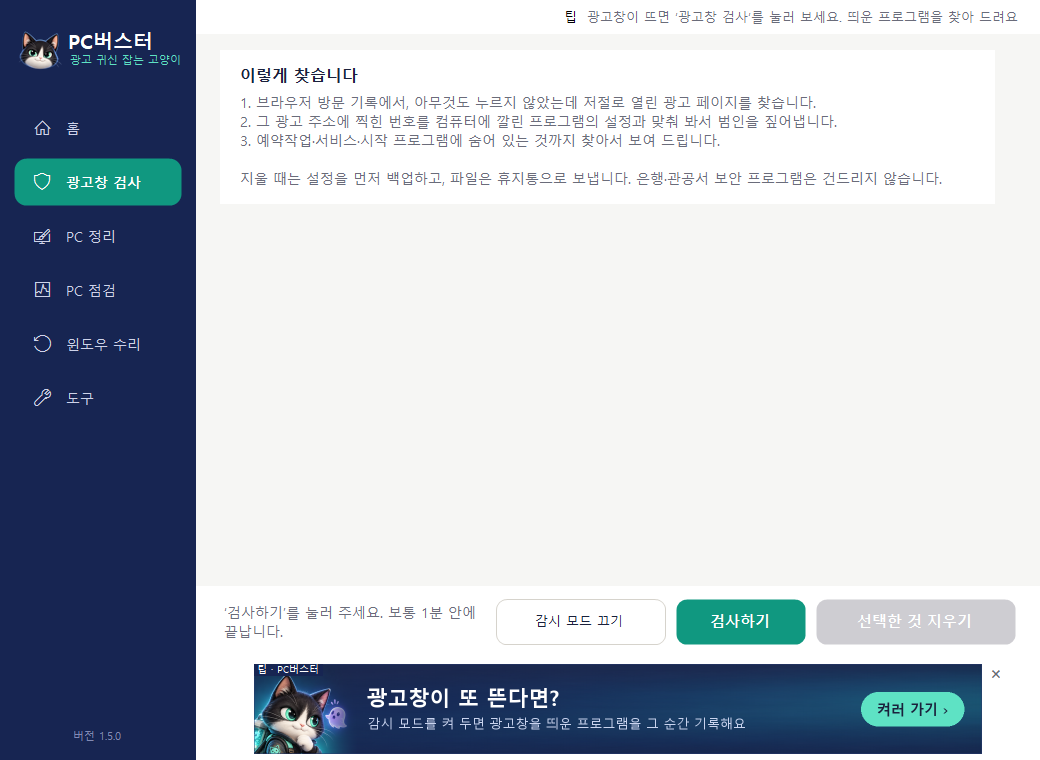
Adware Scan screen

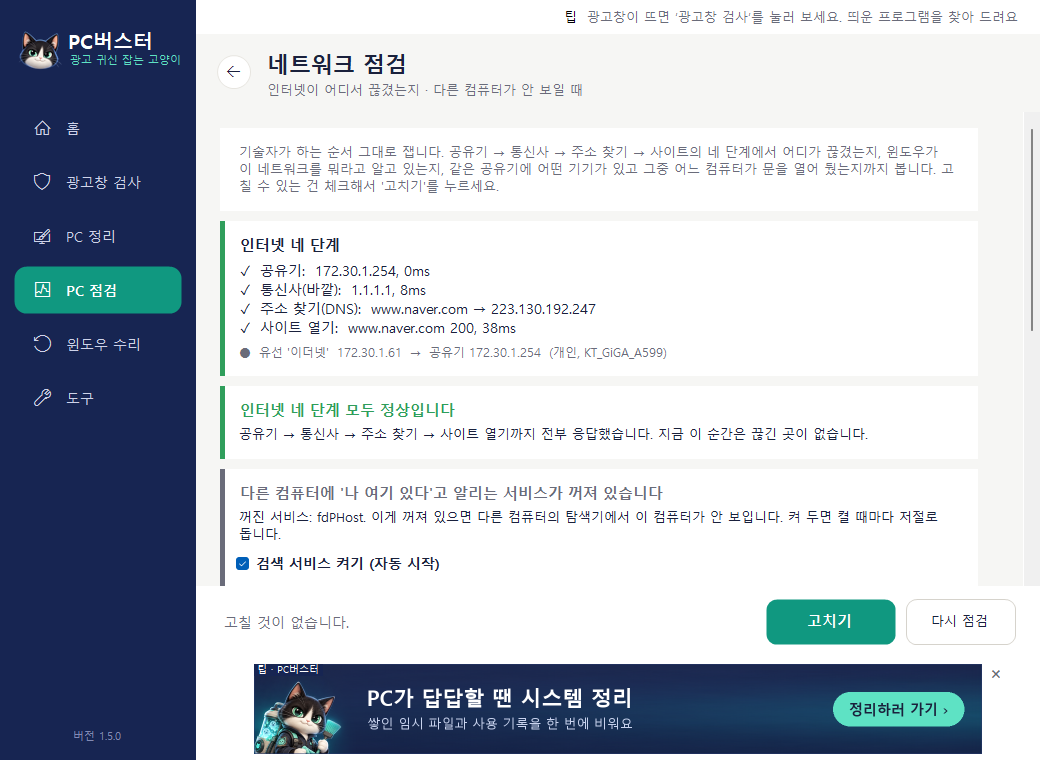
When the internet drops or other PCs don't show up

It measures which of four stages is broken (router, ISP, address lookup, opening a site) and corrects Windows if it has mistaken your home network for a public one. It also finds the PCs and printers on the same router.

Network Check screen

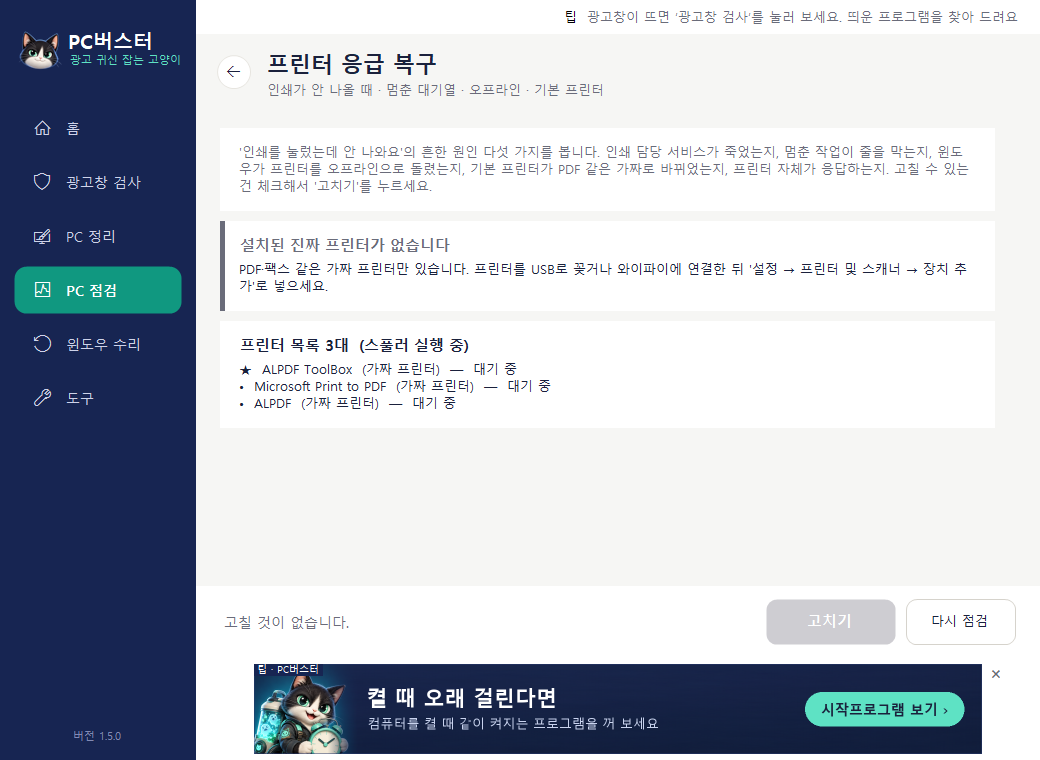
When you hit Print and nothing comes out

It checks whether the print service has died, whether a stuck job is blocking the queue, whether Windows switched the printer to offline, and whether the default printer got changed to PDF. Tick the boxes, press Fix, done.

Printer Rescue screen

24 features included

If you've used GoClean (a popular Korean cleanup tool), the familiar features are all here, plus the things a technician used to do for you over remote access.

Windows Repair

  • Windows Update RepairMicrosoft's official steps as buttons · Undo
  • Shared Folder · Printer RepairWhen you can see it but can't get in · shared printer 0x0000011b
  • Windows 11 Annoyance FixesKorean IME · ads · taskbar · right-click menu
  • Device RescueSound · Bluetooth · Wi-Fi · graphics card
  • Slow StartupBoot log · heavy startup programs · Fast Startup
  • Deleted File RecoveryRestore from the Recycle Bin (free) · deep recovery of emptied files

Ad Pop-ups · Security

  • Adware ScanFind and remove secretly installed adware
  • Watch ModeRecords which program opened an ad pop-up, the moment it happens
  • Ad Bookmark · Notification CleanupChrome · Edge · Whale · Brave
  • Internet Tune-upDNS flush · DNS tampering · proxy · hosts check

Check · Recover

  • Network CheckFind the broken stage · public/private · see other PCs
  • Printer RescueSpooler · stuck queue · offline · default printer
  • Blue Screen LogWhen and why, in plain words
  • Disk HealthLifespan · hours used · temperature
  • CPU · GPU TemperatureOnly the values Windows reports
  • System Info · Usage TimeSpecs and the last 7 days of use

Cleanup · Tools

  • System CleanupTemp files · usage history · Recycle Bin
  • Scheduled CleanupRuns on the day and time you set (pass)
  • Bank Security Module CleanupSee which bank installed which module, tick and remove
  • Registry CleanupOnly entries pointing to missing files, restorable
  • Startup Programs · Task Scheduler · ServicesTurn off what starts with your PC
  • When the Internet Is SlowSee and stop programs running in the background
  • Uninstall Programs · Force Delete FilesEven the ones that won't go away
  • Full Shutdown · Hidden ShortcutsWhen a restart didn't help · reviving a frozen screen · screen capture
  • Shutdown TimerShut down after a set time

Before you install

This is a free program funded by ads. Here is what it does and doesn't do, up front.

Ads stay inside the program window

One banner slot at the bottom of the window and one line of text at the top. No ads pop out of the window, no ad site opens when you close the program, and no browser opens unless you click. When an affiliate ad is shown, a note that we earn a commission appears right next to it.

The only thing it sends is the version number

On launch it fetches the ad list, and the only thing it sends is the program version. No files, scan results or personal data. The server keeps only daily totals: how many times the program was launched and how many times ads were shown and clicked. IP addresses aren't stored either.

A blue warning appears the first time you run it

We haven't bought a code-signing certificate yet, so Windows asks about an "unknown publisher". It's not a virus, just the cost of signing. In the warning, click More info, then Run anyway.

How to uninstall

Open Windows Settings → Apps → Installed apps, find PC Buster and click Uninstall. Same as any other program.

It installs inside your user folder (AppData\Local\Programs\PC버스터 - the folder keeps the Korean product name) and asks for administrator permission only at the moment it removes or fixes something.

Download it now and start with an Adware Scan

One install, and the consent screen shows you the points above again. If you don't like it, you can uninstall right away.

Download PC Buster 1.9.0
Windows 10 · 11 (64-bit)  |  0.9 MB installer  |  Nothing else to install